A few weeks ago I was invited to write an article for the AMSAT Journal, an online magazine of amateur satellite communications. The article is now out, in the January/February issue! You can see my article below, or you can subscribe to the journal to read all the articles in this issue and back issues! It’s a fascinating magazine, and I just subscribed myself!
I’ve wanted an azimuth/elevation mount for a while, but never had the money for a real one! Even used models go for $700 and up, so the sticker shock always kept me away. Building my own always seemed complicated and confusing, since it combined all the skills I’m only sort of OK at. Aligning motors, balancing things, programming motion, reading a sensor, and automating the whole rig just seemed like a lot of work!
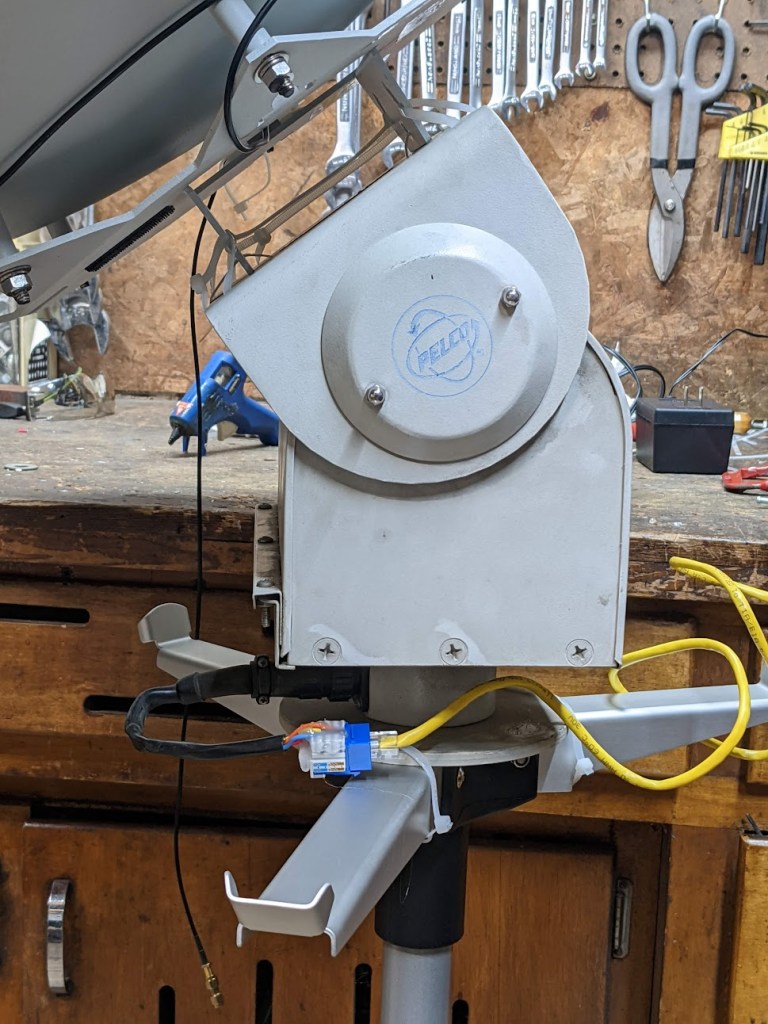
Fortunately, a few factors made this project relatively easy! First, I got a used pan/tilt camera mount from Ax-Man Surplus. This is a nice robust unit designed to move old-fashioned heavy security cameras, so it can take some weight and doesn’t need too much balancing.
Next, I discovered I could modify the design and code from the SARCNET Mk1 Tracker to use this camera mount. The original project had options for different motors, including a homemade mount assembly and a pair of regular old TV antenna rotors. My camera mount was functionally and electrically similar enough to a pair of rotors that it worked just fine! The main modification I did to the mount was to remove the side cover and slide the vertical limit switches farther apart. This lets me move the mount a full 180 degrees. So far the tracking software hasn’t needed to go a full 180, for overhead passes it just spins the dish and then goes back down the other side. If your camera mount can do a 90-degree elevation, that should be sufficient.
The SARCNET project is aimed at Yagi-Uda antennas for 2m and 70cm (VHF/UHF). This is a typical setup for contact hamsats and talking through the amateur radio repeater on the International Space Station. I wanted to use a parabolic dish for L-band (~1700Mhz). That would let me receive images from satellites like the NOAA POES series, Russian METEOR series, European METOP satellites, etc. While some of these satellites also transmit images on VHF, the L-band signals are higher bandwidth, higher-quality images and contain more data. The VHF signals can be received with a stationary antenna like my QFH rig, but L-band usually requires an aimed directional antenna that tracks the satellite as it passes overhead.
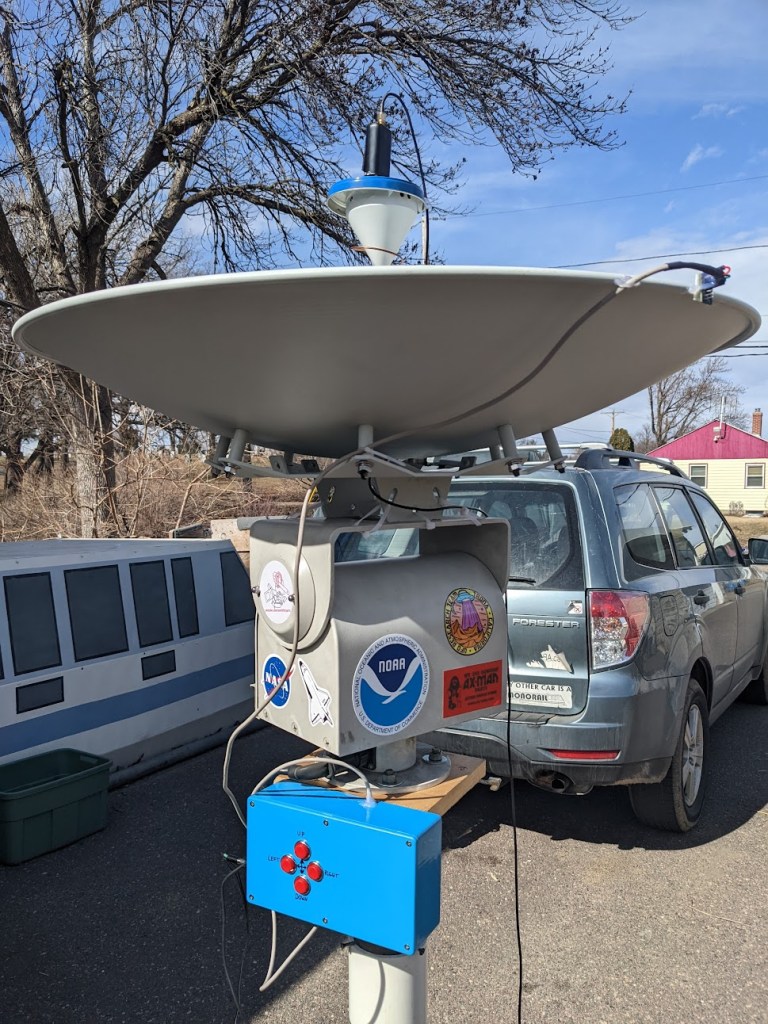
My take on the SARCNET Rotator worked great with a dish! I’ve used this dish for other projects in the past, it was originally a 5.8ghz wireless network antenna, given to me by another local ham. This project would also work with a Wifi grid dish or any small lightweight antenna (even an umbrella covered in foil!). Note that this is a pretty beefy pan/tilt mount, mine is a model PT570. It can handle my reflector without any counterweights, but if you use a lighter-duty camera mount you may need to balance it with a weight opposite the dish. Some larger pan/tilt mounts do exist, and some apparently have built-in position sensors. Mine just has 5 wires for control. One common, and one for each of the 4 motion directions.
My control box was also slightly different than what SARCNET used. I had a slightly different Arduino, and I couldn’t find the Triac control board they suggested. I ended up using relays to run the motor, which seems to work just fine. The things do make a lot of clicking and clunking at low speed and for fine tuning, so hopefully I’m not wearing them out too fast! They only cost a few dollars on Amazon, so I’m not too concerned. I’m using the same sensor suggested by SARCNET (the LSM303DLHC). Calibrating it is a little fiddly and took me a couple tries. They have a video about the process here.
My wiring is pretty messy in the above photo, so here’s a diagram of what I did:
I mounted the parabolic dish flat on the top of the camera mount, and placed the sensor at the rim of the dish. My reflector is made of aluminum, so it doesn’t affect the sensitivity of the accelerometer / compass chip. I had previously tried placing it closer to the base of the dish, but the sensor was confused by the motors in the camera mount.
For the radio system, I’m using an RTL-SDR Blog v4 on a laptop, connected to a Nooelec SAWBIRD GOES on the dish (these links give me a small Amazon kickback if you buy from them!)
I followed the Compilation and Set To Work instructions on the SARCNET website. Once the Arduino code is loaded, and I had Hamlib and Gpredict on my PC, my procedure for use is as follows (using Linux):
Ensure rotor has enough play to follow sat (check position of cut-off switches underneath)
Connect SDR
Connect 24V AC to pointer
Connect USB from pointer to PC, Dish will rotate to Az 0, El 0.
Open terminal, run “rotctld -m 202 -r /dev/ttyACM0 -s 9600 -C timeout=500 -vvv -T 127.0.0.1 -t 4533”
Open Gpredict
Select / open desired module
Options -> Antenna Control
Select target sat and click “Track”
Select rotator device (“MediumDish”) and click “Engage”
Dish will run to initial Acquisition of Signal (AOS) position and wait
If serial connection crashes (rotctld window start showing errors and dish stops moving)
Unplug 24v
unplug and re-plug USB
Ctrl-C rotctld and re-run. May need to change ACM0 to ACM1
Go back to Gpredict rotator controller and re-select “Track” and “Engage”
Re-connect 24v
Settings for Gpredict:
In Preferences -> Interfaces -> Rotators
Host: 127.0.0.1
Port: 4533
Azimuth type: 0->180->360
Recording and processing the satellite pass is the same as with a handheld dish. I use N2YO.com to look for upcoming passes (Select your satellite, like NOAA 18, click on “10 Day Predictions”, then “All Passes”, and look for ones with a high El number for the max altitude. My procedure for each pass is as follows:
Select the SDR device (sometimes I have to refresh), make sure the sample rate is as high as you can go (2.56Mhz for the RTL-SDR) and click the Play button at the top.
Make sure the BIAS-T function is checked. Sometimes I need to do this several times to get the power light on the SAWbird filter to come on
Set the gain, I sometimes start with max and drop it as the signal improves, or you can use AGC or whatever works best for you
Set recording settings to Baseband, WAV, Int16
When the satellite is in view and the antenna is tracking, click “Record”
When the signal drops and the pass is over, stop recording
Select the appropriate satellite pipeline from the list at the top
Set the Input File to the baseband recording I just made
Set the Output Directory to wherever I want the images to go (I usually make a new folder for each satellite and pass)
Make sure the Baseband Format and Samplerate are the same as SDR++ (this should automatically update once the Baseband recording is loaded)
Click Start
Once the processing is done, open the Output Directory and see what I got!
As with all of my projects, this too plenty of trial and error, and didn’t work right on the first few tries. Eventually everything came together and worked smoothly! I’m looking forward to repeating this with some other types of antennas, like VHF/UHF Yagis. I’m also planning to do a bigger dish in the near future!
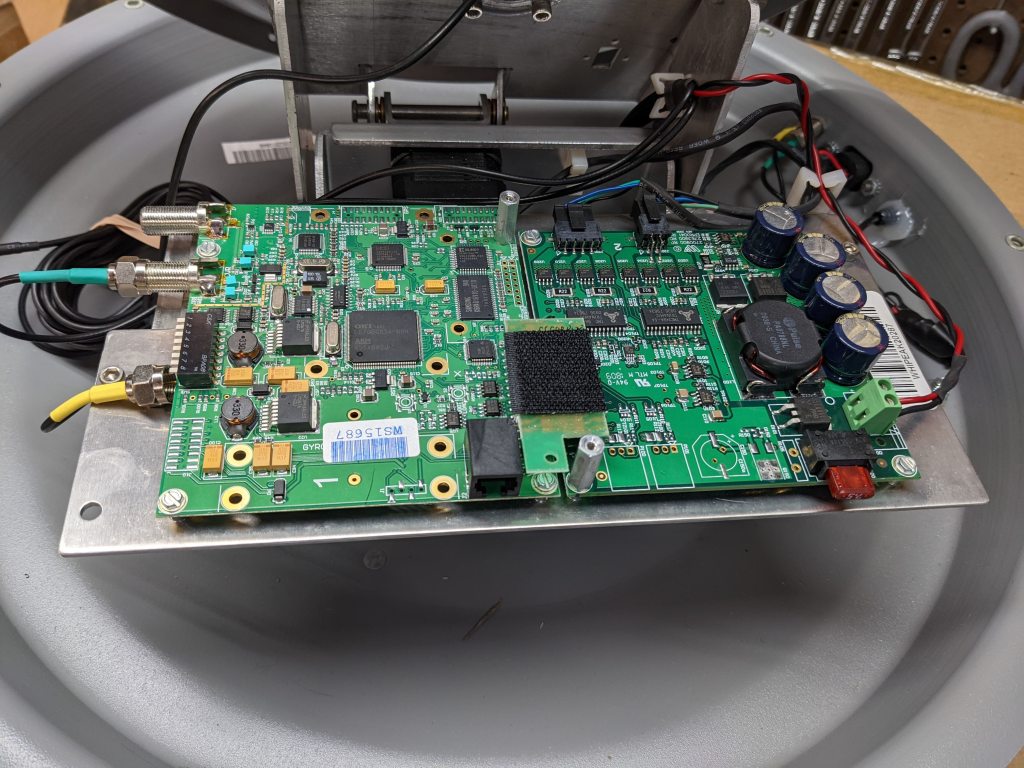
It appears to have an ARM-based control board with a stepper motor daughterboard. The only interface I’ve been able to use is an obscure RS-485 to RJ25 jack.
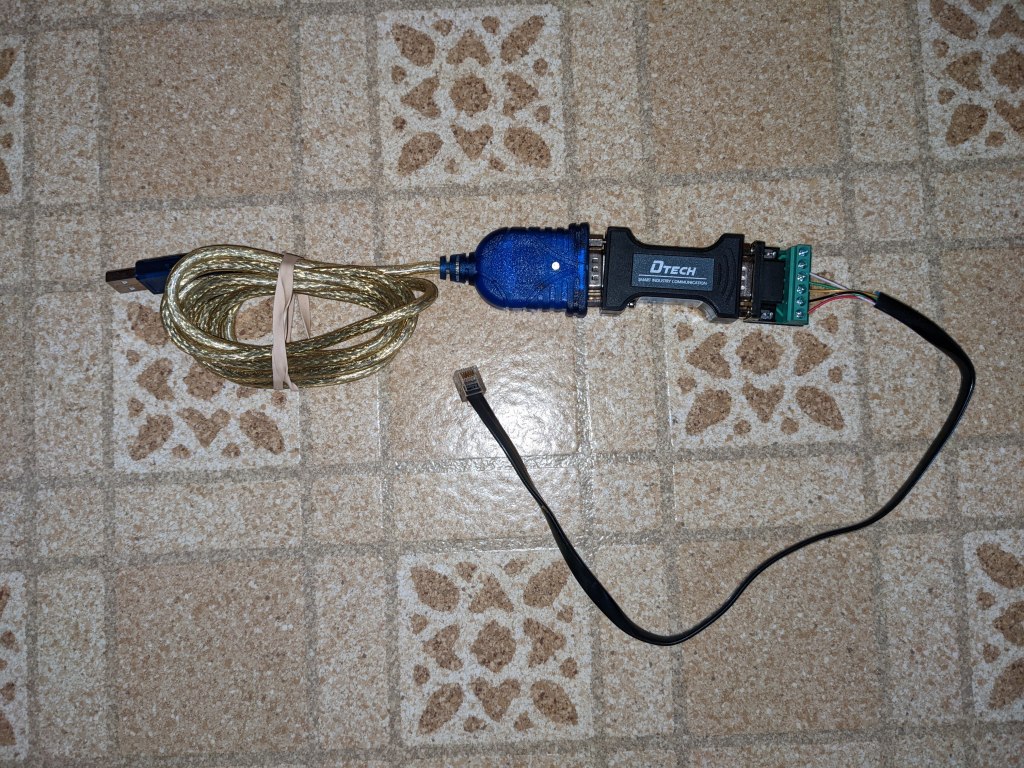
I had initially showed this on my Youtube channel, and then shoved it onto the ever-growing “to-do” pile. A viewer commented that they could get a serial console with some cable adapter trickery. A USB-to-RS232 cable goes to a Dtech RS232-RS485 adapter, then to a custom RJ-25 cable (6-conductor phone cord). It looks like this:
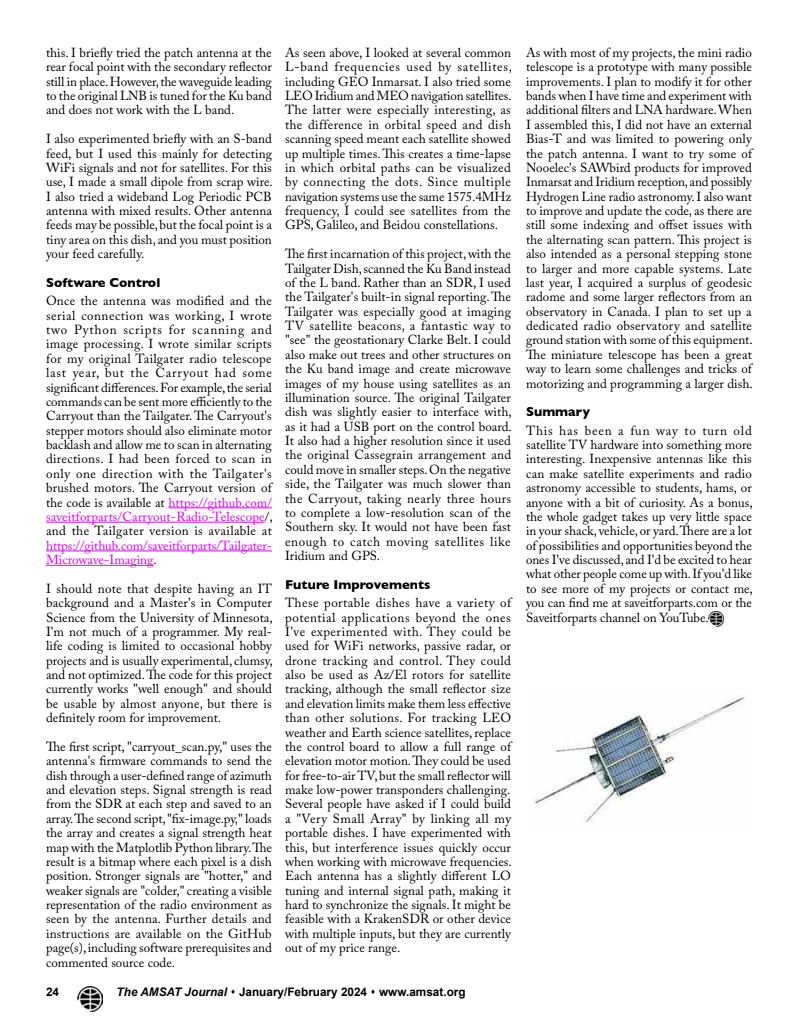
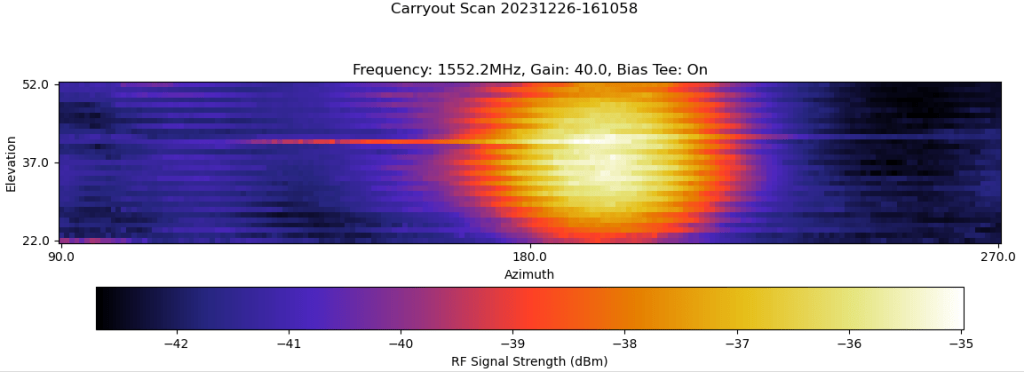
I was able to duplicate this and connect to the console port on the antenna’s brain. I modified my Dish Tailgater code to drive the dish and read signal strength. This time, instead of using the onboard Ku-band LNB, I stuck an L-band patch antenna on the dish and used a Software Defined Radio to read the signals.
I’m using an RTL-SDR Blog V3. They seem to be out of stock, but you can get the RTL-SDR Blog v4 for the same price! (link goes to my Amazon affiliate page and gives me a commission if you buy one)
Here’s some info on the L-band patch I’m using. These little antennas are $5 at Ax-Man surplus, or you can find them on eBay.
After about two weeks of struggling with the code, feed, motor indexing, and other issues, I finally got a couple images of various L-band satellites. This is what the satellites look like in radio frequencies as they pass over my location.
First up is Inmarsat-4 F3. This is a geostationary satellite, so to me it looks like a fixed point source in the sky:
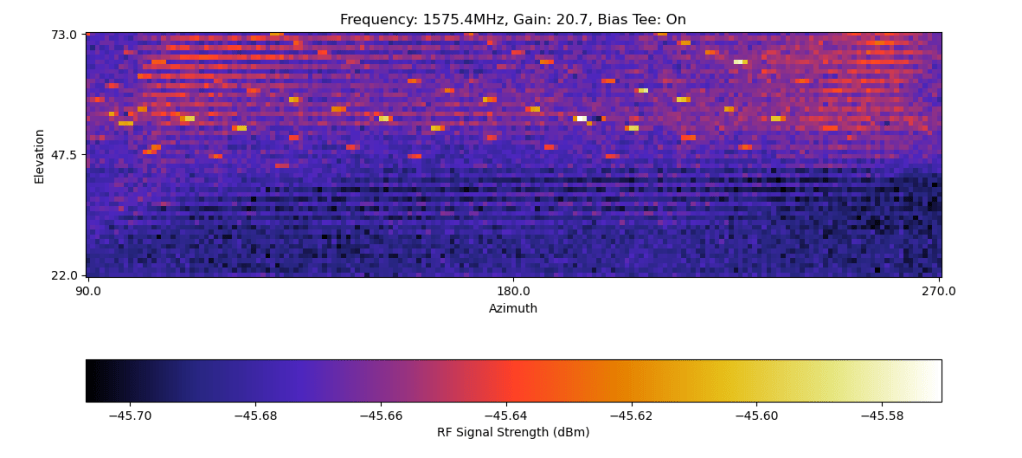
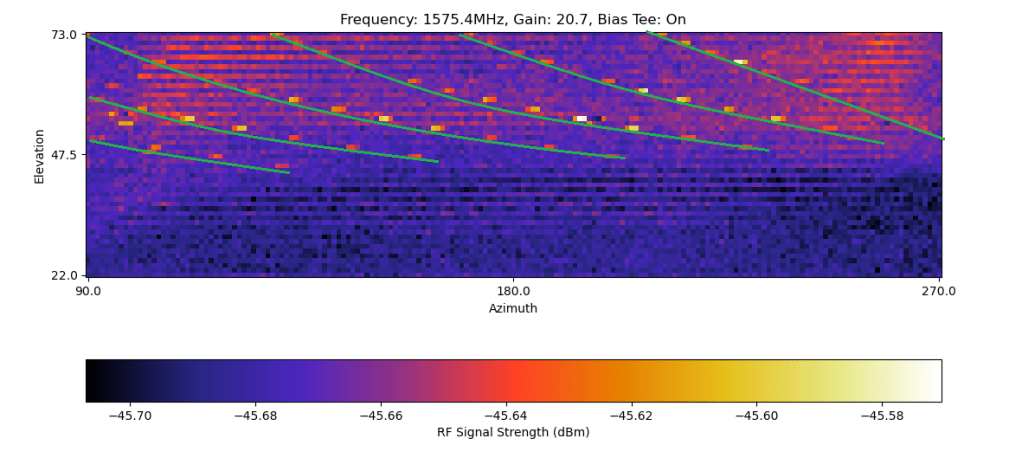
Next are some navigation satellites. These are in Medium Earth Orbits, so they move slowly enough (from my viewpoint) that the dish caught them multiple times along their orbital tracks. This frequency is used by GPS, European Gallileo, and Chinese Beidou satellites, so I could be seeing a combination of different systems (Russian satellites use a different frequency).
Here’s my attempt to trace each path in MS-Paint for more clarity:
And finally, here’s a Low-Earth-Orbit Iridium satellite. This went over pretty quickly and appears as a long streak on the left. I scanned with a more limited azimuth to try catching this faster, but I still almost missed it.
I also tried looking at Wifi frequencies (using a Ham-It-Down converter to get into the 2.4ghz band). However, this didn’t work as well, either due to my feed or my code.
I have a few more issues to work out, such as the choppy image that seems to alternate clockwise and counterclocksise motions with different signal strengths. This could be due to a number of things, and I never quite figured it out. I’d also like to try other frequency ranges, like more S-band, Wifi, and fainter L-band signals like GOES. Those improvements will probably have to wait for next year!
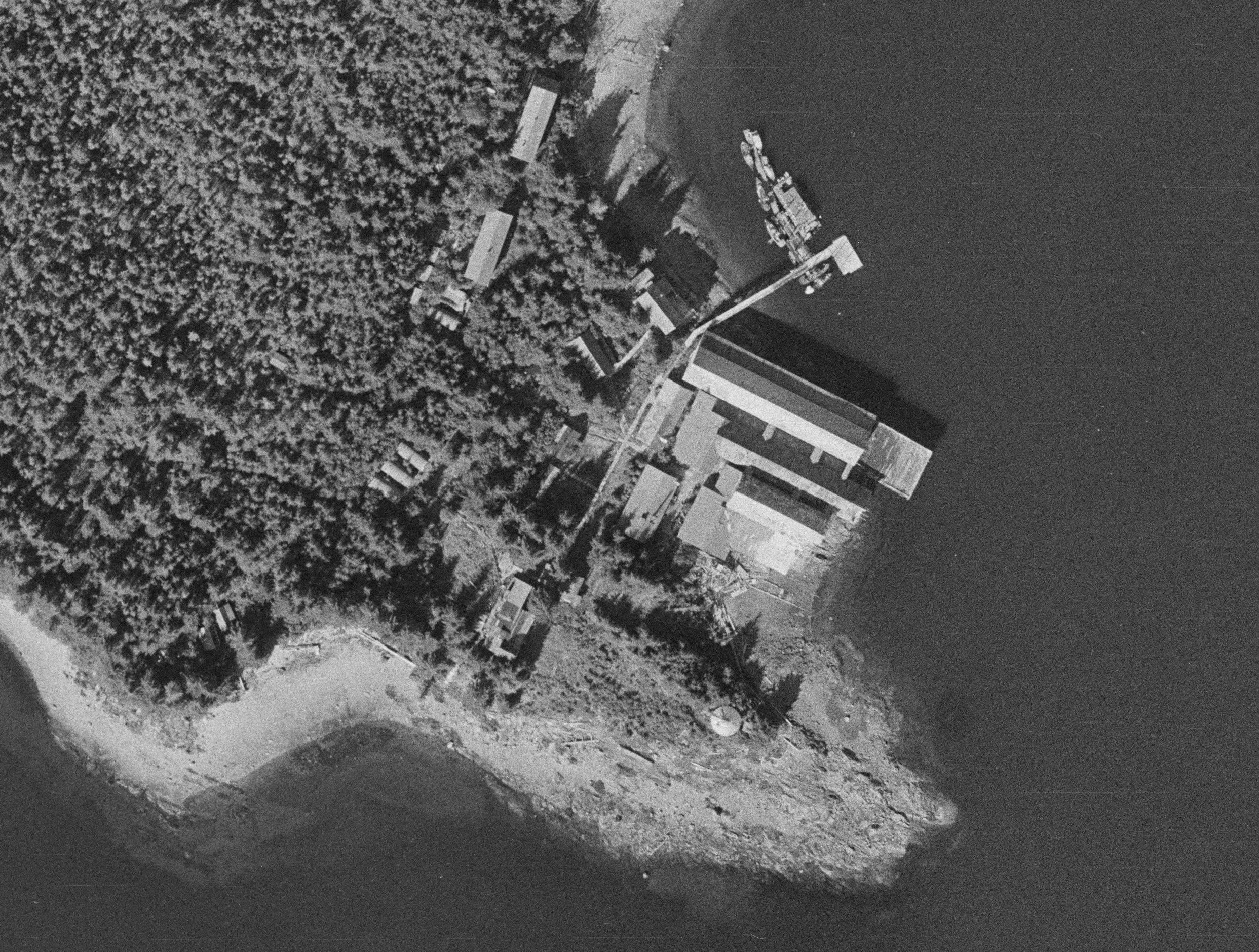
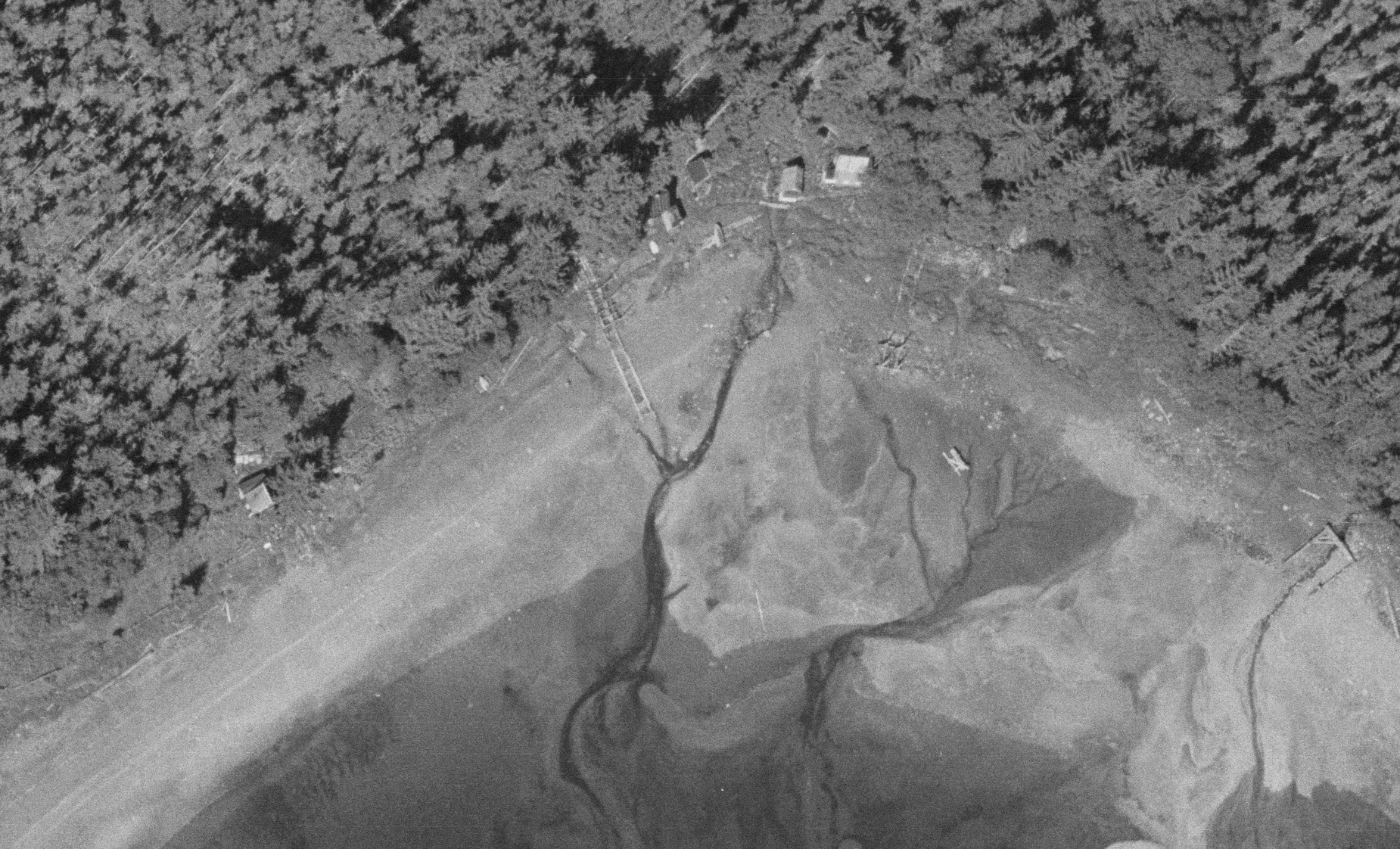
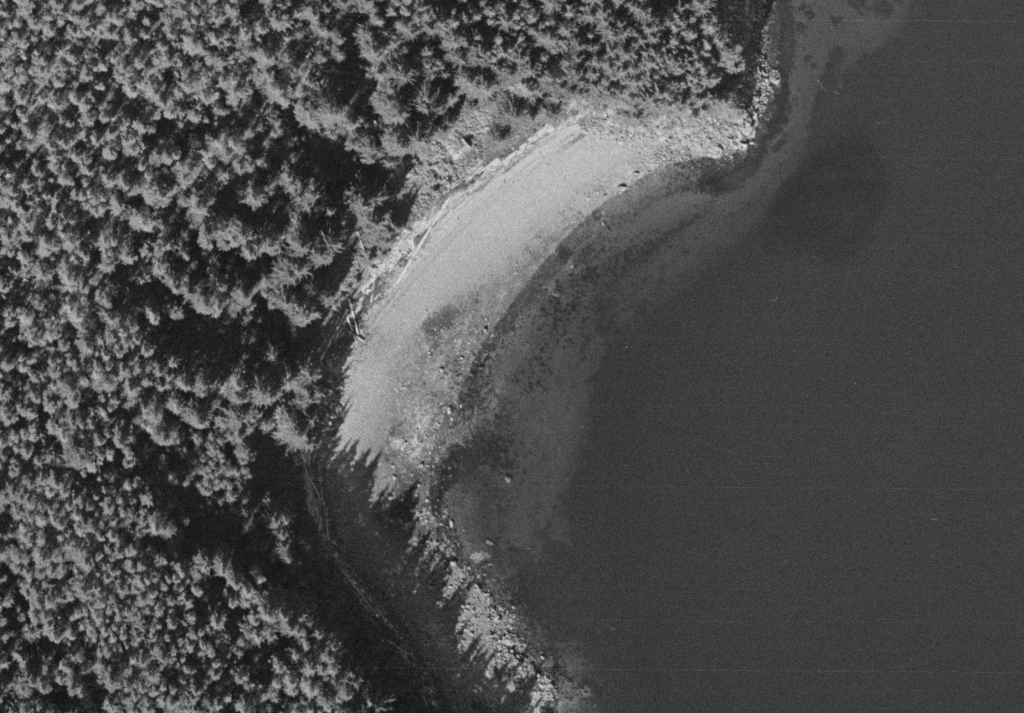
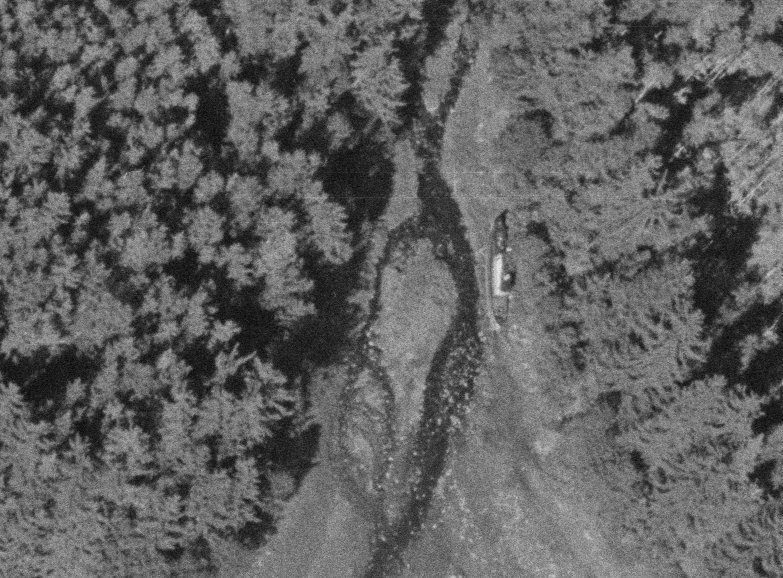
Recently I was browsing through the USGS Earth Explorer website, looking for historic aerials for another project I’m working on. I came across a set of 1965 aerial photos of Funter Bay that I don’t think I’ve seen before.
The photos run in a series of 4, going approximately North to South over the West side of the bay. They clearly show the Thlinket Packing Co cannery (owned by Peter Pan Seafoods at the time).
These are pretty high-resolution photos, I’m only able to post snippets here since the full size images are huge! Other areas of detail include several homes and cabins, like Harold and Mary Hargrave’s place:
You can also see the “neighborhood” where I grew up, Crab Cove. This was before most of the modern houses and cabins were built, some of the structures seen here were later torn down or incorporated into larger buildings. My family’s house would be near the top middle, between the creek and the railroad-like marine slipway
These photos were taken on July 8th, 1965, during the fishing season. The time may have been later in the evening, as you can see several salmon trollers anchored or reversing to anchor:
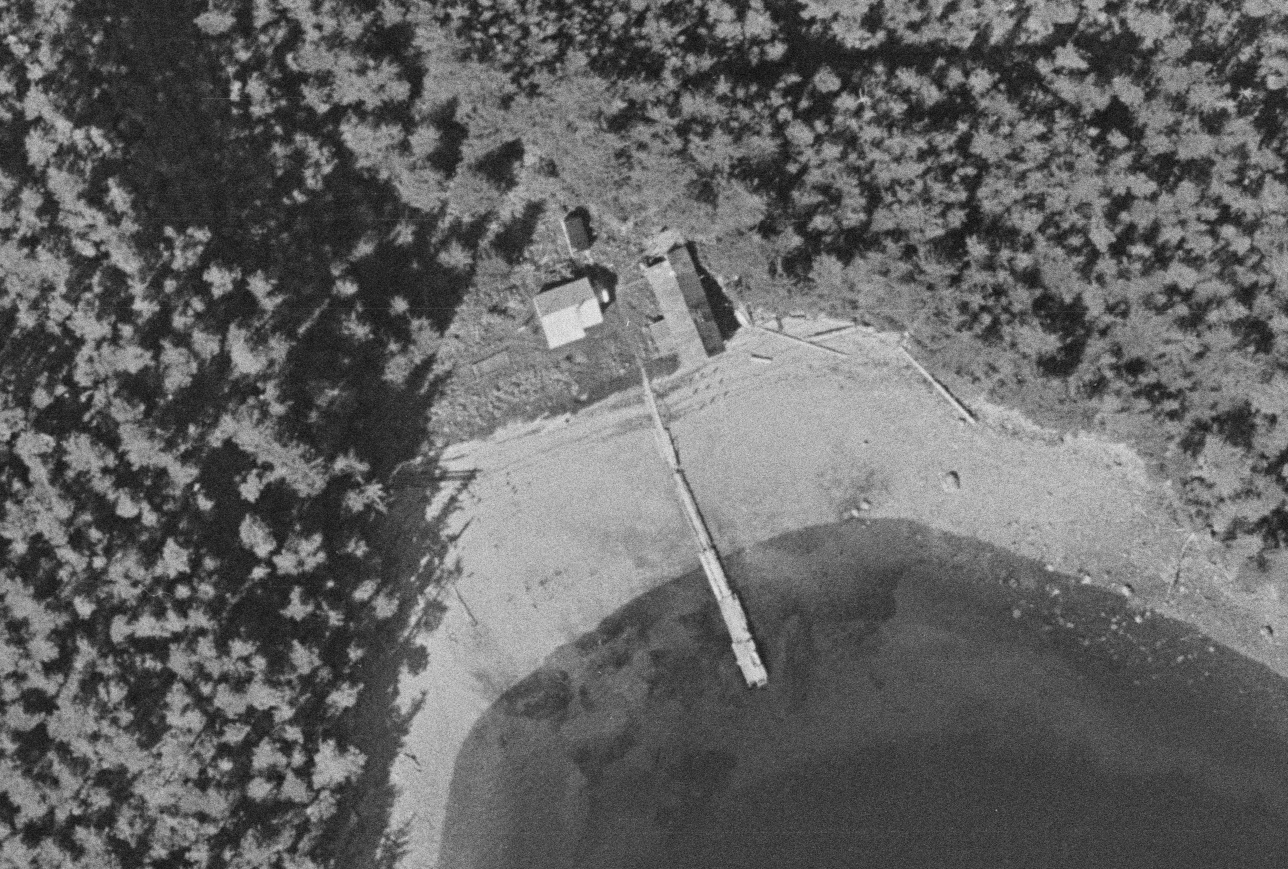
You can also see various ruins and abandoned relics around the bay, such as the old Keeler Cabin (upper middle):
The wreck of the Nimrod:
And another wreck, likely one of the cannery tender vessels, next to some abandoned fish trap frames:
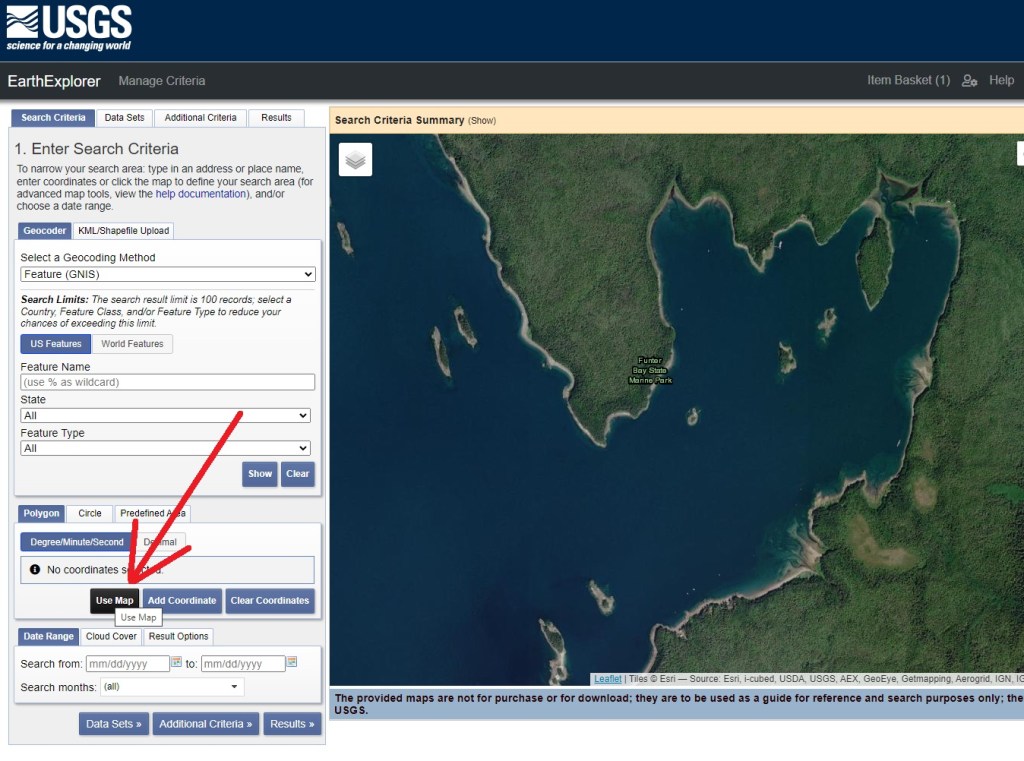
The original images are far too large for my website, at ~250mb each. You can find them on https://earthexplorer.usgs.gov/ with the following steps:
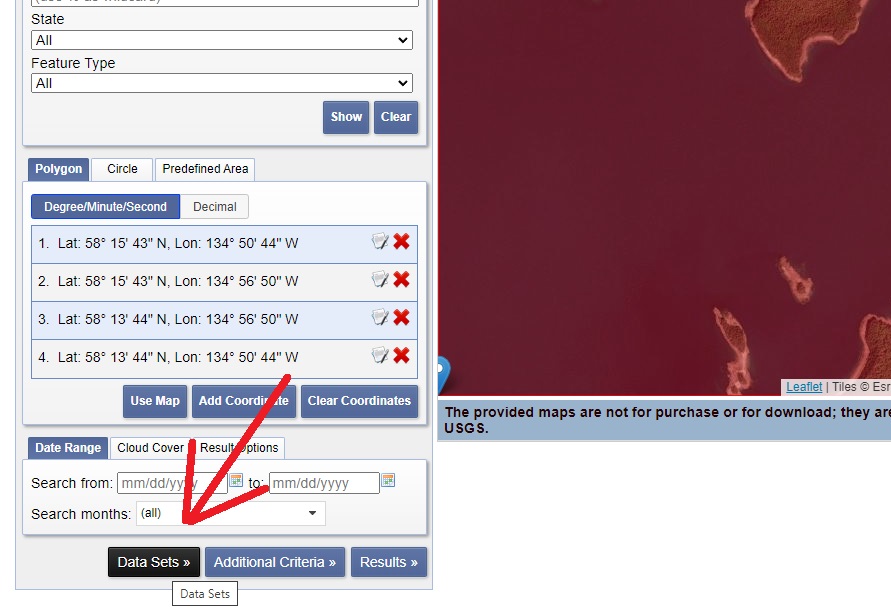
– Scroll to Funter Bay (or other area of interest). Make sure the area you want to search is centered in the website, as seen below, and click “Use Map”:
Next click “Data Sets”:
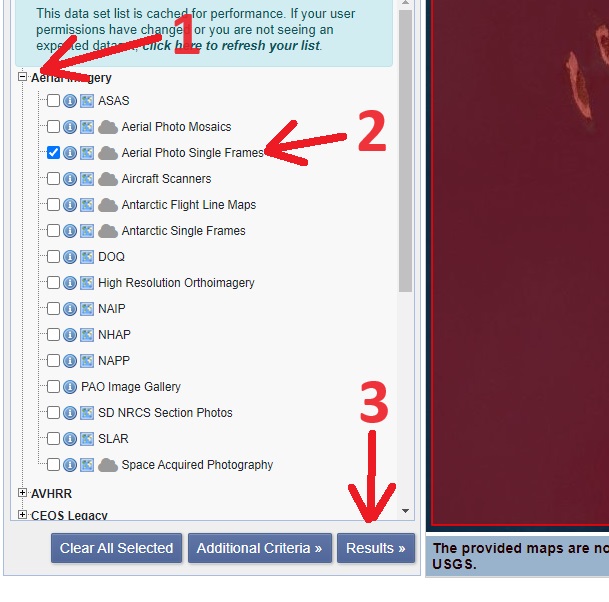
Then expand the “Aerial Imagery” section, select “Aerial Photo Single Frames”, and click “Results”:
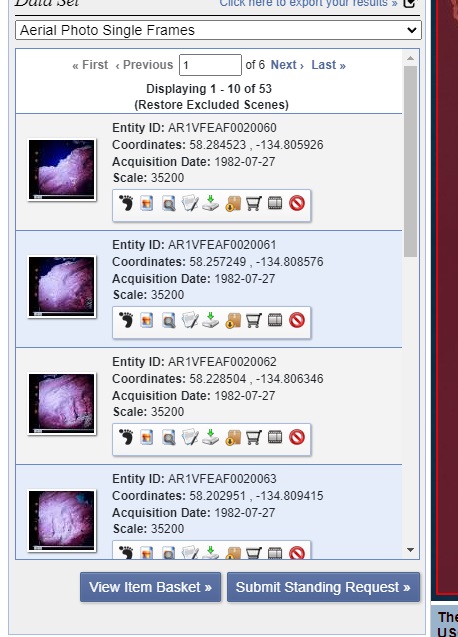
You should now see a bunch of aerial photos of your selected area. For Funter Bay there are at least 6 pages to scroll through, and some of them are mis-matched photos from different areas.
Since it’s a government site it’s not very user-friendly, but it does have a lot of neat content. They are apparently still adding photos and data as archives are scanned, so it’s worth checking back every few years to see if anything is new!
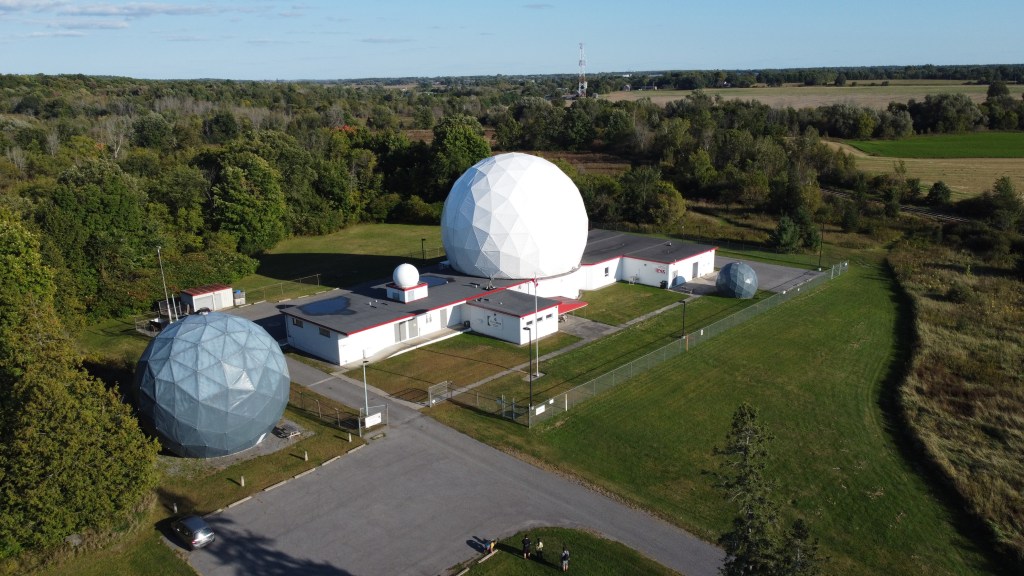
This fall I went up to Ontario, Canada, to pick up an 18ft diameter geodesic dome! (In the picture above, it’s the same size as the one on the far right).
This was at a former NATO satellite facility near the Diefenbunker, outside Ottawa. The big white dome on top of the building is still in use, so we just got a smaller one. You can see the full story below:
We’re planning to install this at Sandland for use as a radio observatory and general cool looking lawn ornament, probably in the upper field near the fast food playland that we picked up previously.
Huge thanks to Marcus Leech and the Canadian Center for Experimental Radio Astronomy (https://www.ccera.ca/) as well as CSS Building Inc (https://www.cssbuilding.ca/) for hooking us up with this! The CCERA is refurbishing the big satellite antenna at Carp into a radio telescope. You can see more about them here:
They’re all volunteers, and as with most science things, they can always use more funding! If you’d like to help CCERA with a donation, click here: https://gofund.me/29c87cc8 Parts of this video were filmed on location at the Diefenbunker: Canada’s Cold War museum. I’ll probably be doing another follow-up video on the bunker since it’s so big and interesting! You can find more about it here: https://diefenbunker.ca/ Thanks also to @SimpleElectronics and Tim Skinner (https://timpossible.photography/) for helping out with this project!
Stay tuned for more videos about this project, coming soon!
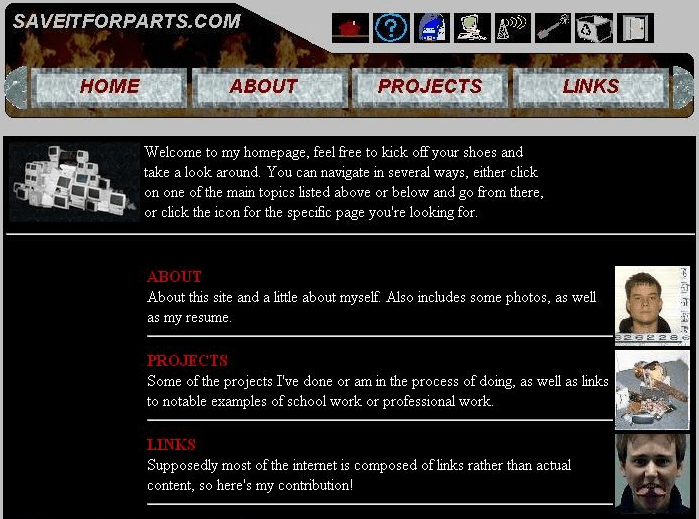
The Saveitforparts website has been around since 2001, when I registered the domain in college. Here’s what it looked like 22 years ago (insert joke about my website being old enough to drink):
The frames… the imagemaps… the 30px gifs… they burn!
The Saveitforparts Channel has been sort of a real(ish) thing since about 2020. I had some content on there before, but it wasn’t really set up as a regular “thing”. After some of the monorail videos got popular, I started doing project videos on YouTube. They were awkward, clumsy, and apparently popular enough to get me 1,000 subscribers pretty quickly.
The channel kind of poked along, getting not-that-many views on average. Occasionally there’d be a spike in viewership as the mysterious YouTube algorithm picked something up and promoted it.
Fast-forward to this spring, and the ever-mysterious algorithm decided to push some of my videos to the front page. Boom, suddenly I had 100k subscribers. I’m still not sure how it happened, and the traffic count died off just as fast as it usually does from one of these spikes. For those who think you rake in the cash at 100k… nope! I think you have to be up in the million subscriber range to quit your real job. What you DO get is every seller on Amazon asking you to review their products. Free samples are fun, but I don’t want to become just a review channel!
Anyway, YouTube sends you a wall plaque when you hit certain milestones, and the meme-y thing to do is mistreat them in some way. I took it easy on mine since I actually want it hanging on the wall! Instead of strapping it to a rocket or a submarine, I strapped it to a satellite dish! I was surprised to find that it had good SWR at the frequency range used by military SATCOM systems. Since these are mostly taken over by Brazilian truck drivers, it meant I could listen to CB traffic in Portuguese. Since I don’t speak Portuguese, this is just as entertaining and useless as it sounds.
Anyway, that’s all I have on this Youtube Thing at the moment. I’ll keep cross-spamming my interesting videos over here, and as always you can find them all here.
Schell’s Brewery in New Ulm MN is one of the oldest (actually the 2nd oldest!) family owned breweries in the US. They’re also the home of Grain Belt beer, a favorite drink and occasional sponsor of my shenanigans. Since most breweries in Minnesota included sandstone caves, I’ve always been curious what’s under Schell’s campus. A couple weeks ago I got the opportunity to find out!
Sadly, there’s not as much left of the original cooling / lagering caves as I had hoped. Brewery expansions over the years have sealed off, filled in, and otherwise lost some of the cave system. However, the section that’s left is actually still used for making beer! That’s pretty unique among local breweries.
Thanks to Schell’s and their fine PR staff for getting us down there to check it out!
I’ve been shopping at Ax-Man Surplus stores for years, ever since I moved to the Twin Cities. They’re just the right mix of odd junk, industrial surplus, crafting, tools, materials, electronics, and funny signs and labels! I’ve often joked that anything I didn’t find in the trash came from Ax-Man.
Recently (ish), I was able to tour the store for my YouTube channel! This way, anyone who has the misfortune of living outside the Twin Cities can experience the wonders of Ax-Man for themselves!
When I built a DIY microwave imager earlier this year, I left some of my code unfinished. The high-resolution option seemed a little tricky at the time, since it used an unreliable and little-documented feature of the Dish Tailgater known as a “nudge”. This command, sent over USB serial connection or from a set-top box, would run the brushed motors in the antenna for just a second, pushing the antenna slightly closer (hopefully) to the best signal. Each azimuth nudge is approximately 0.2 of a compass degree, although as I found out later, this wasn’t the case for elevation.
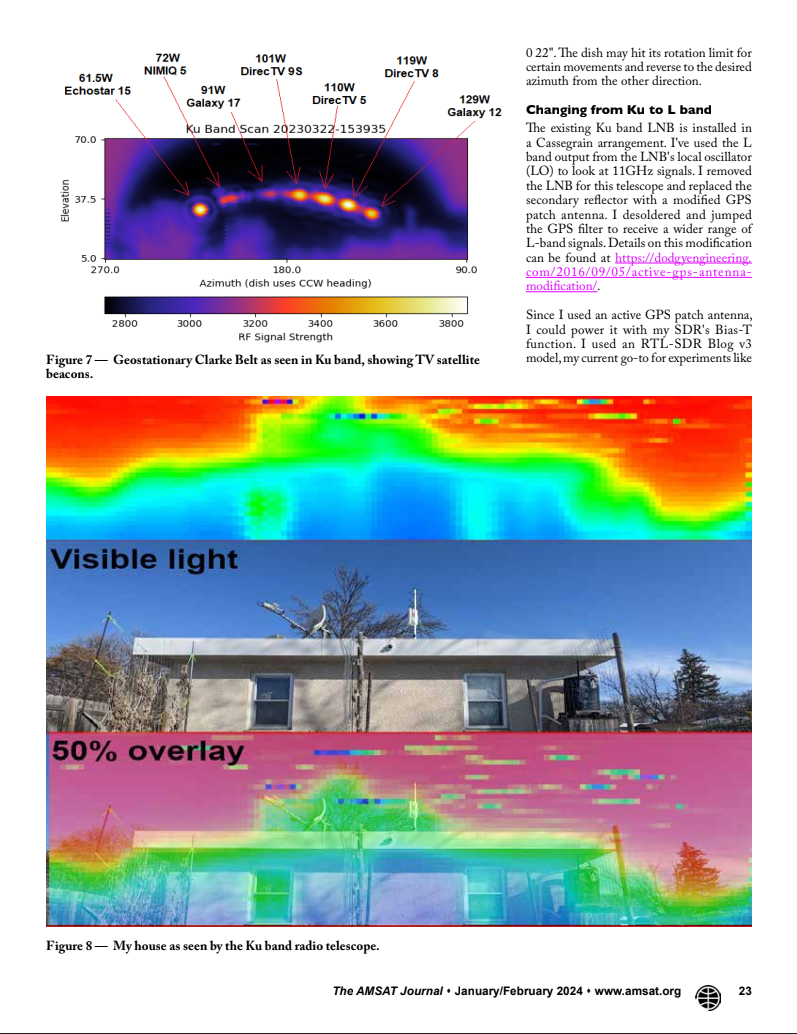
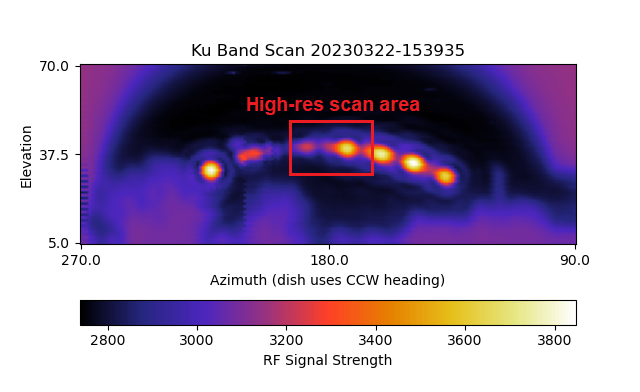
Obviously, I wanted to improve my original low-resolution scan (seen above), that showed geostationary TV satellites in the Clarke Belt. In the above image, each pixel represents one degree of azimuth and one degree of elevation. Panning the dish back and forth through 180 degrees of Southern sky took a whopping 3+ hours to complete. Due to a quirk of the antenna programming, that was the absolute fastest I could make it run. And even that took some fancy handling of the signal data being returned by the serial terminal.
Below is a close-up of the inset box seen above. This is still using the low-res code, where each colored square is one degree wide and tall:
Originally I had the dish scanning back and forth in alternating directions. This was (slightly) faster, and looked cooler, than having it return to the origin azimuth for each elevation. However, I had ongoing issues with gear meshing (switching from clockwise to counterclockwise had some slack or play in the motor). I also had issues with my indexing that never quite went away no matter how I massaged the python data array or bitmap. Making things worse, the “nudge” motor runs aren’t consistent in each direction. Clockwise nudges are a different amount of antenna travel than counter-clockwise, so the image slowly drifted off at an angle. Commenters on Youtube and Github kept suggesting I ditch the alternating scan and just go in one direction each time. At the expense of my cool looking dish motion, I finally gave in and did that. The result is that high-resolution now works!
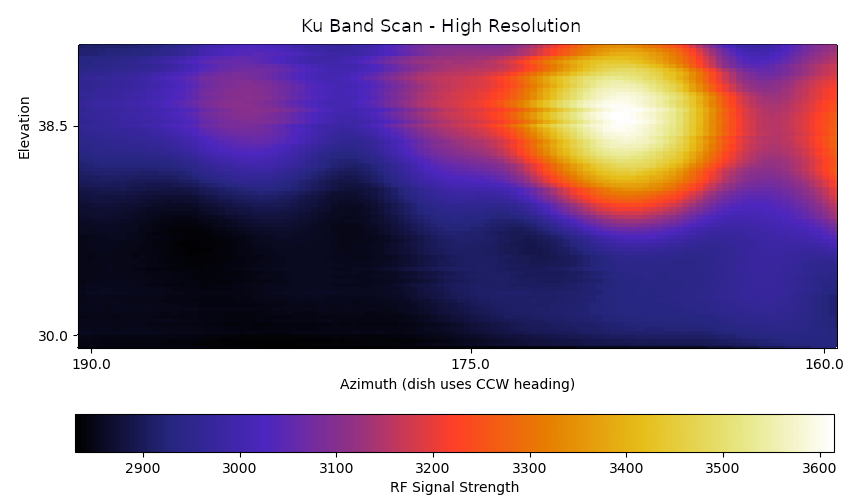
I wasn’t certain this would work at all, even after getting the motor movements to cooperate. For one thing, the beamwidth of this little 14″ dish is more than a degree, so I was worried that 0.2-degree movements would just give me a mess of noise and artifacts. It turns out that the smaller movements do get a better picture, although you can still see some fuzz and reflections around each satellite transponder source.
Another issue is that (as mentioned before), this Tailgater satellite dish isn’t designed to do any of this. I’m running the motors nearly constantly for hours at a time, when the typical TV-watcher-on-the-go would only run them for a few minutes and then leave it alone until they moved their RV / campsite / fish house. I noticed the more I ran the dish, the more horizontal bands and artifacts showed up in the high res scan. I also started hearing squeaking and grinding noises from the antenna as the poor overworked motor struggled to act as a radio telescope. I took the antenna apart and shot some silicone spray into the worst areas, but eventually I’ll probably ruin the thing!
Keep in mind that the high-res code is 5x more detailed in the x direction and 3x more in the y direction. so it will run 15x slower than the low-res version!
There are also some pull requests from people with suggestions to improve my code, which I have been shamefully ignoring since I don’t understand them and haven’t had time to test them out. If you’re better at Python coding than I am, feel free to poke around and make this better!
Who knew “portable” satellite dishes were a thing? Sure there are some 90’s and 2000s versions like the Dish Tailgater models I’ve been experimenting with, but did you know there were fold-up C-band dishes from the 80s?
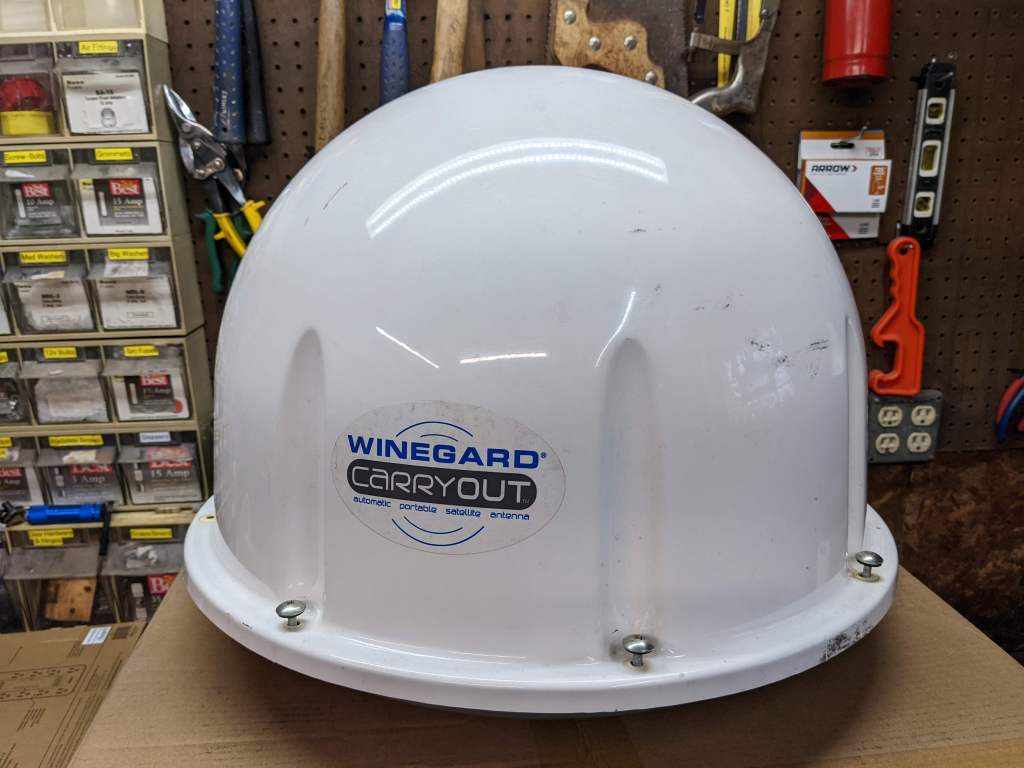
I’ve also opened up a few of Tailgater’s competition, the Winegard brand dish. These seem to have a little different construction, using stepper motors instead of brushed motors.
I’ll no doubt have some future projects with some of these, so stay tuned!




 Posted by saveitforparts









 Saveitforparts